DMARC/SPF/MX Checker
This DMARC/SPF/MX Checker helps with checking DNS configurations for email as well as letting you validate your SPF records prior to entering them in DNS. If you need to perform changes in your DNS, please refer to your DNS provider.
DMARC and SPF records are special types of DNS TXT record used to improve the security and authenticity of email that is sent from your domain. Since the sender information can be spoofed, SPF and DMARC help in validating that the messages actually come from your domains.
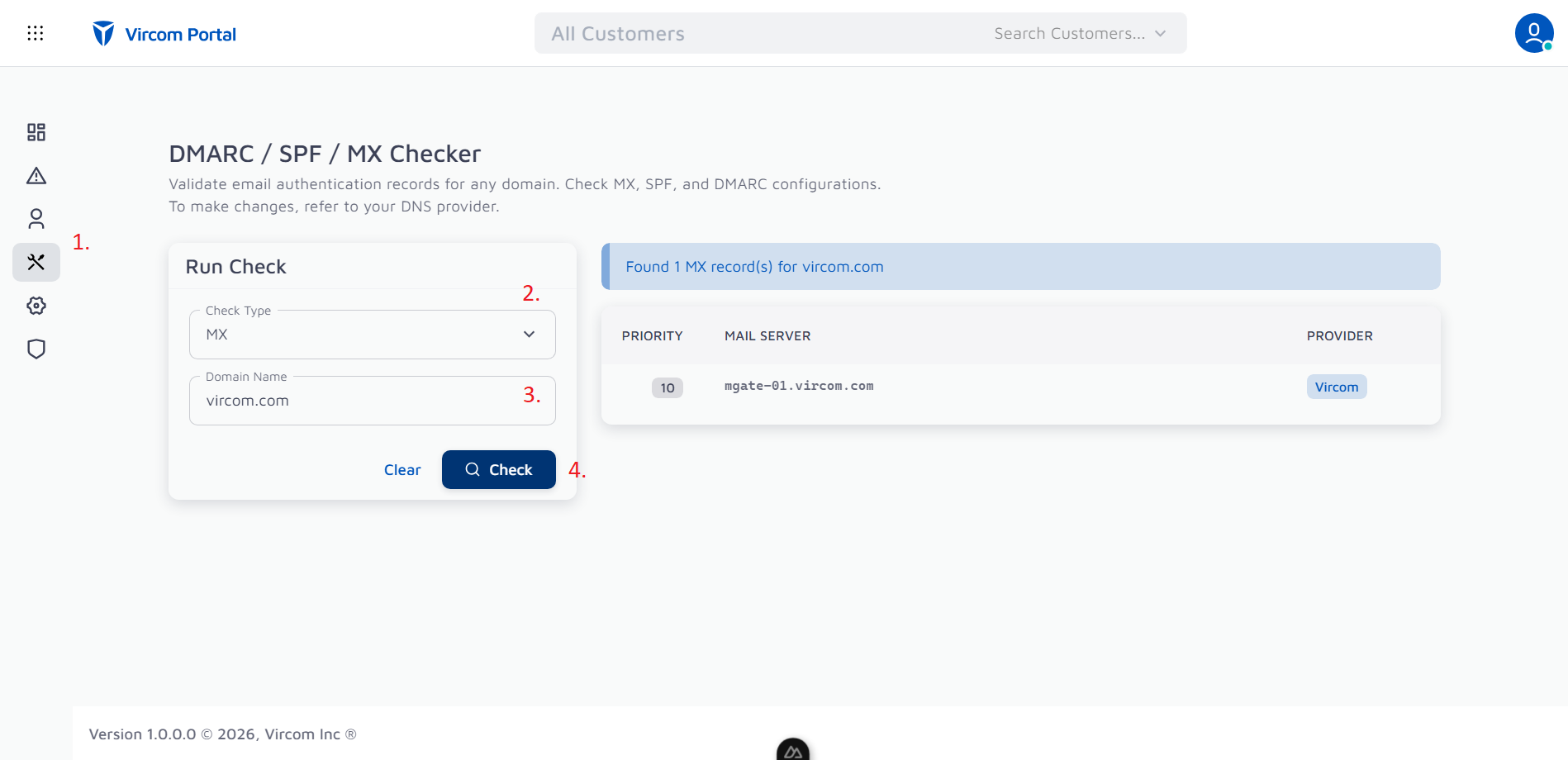
Using the Checker
Step 1: Navigate to the Tools tab in Vircom Portal
Step 2: Select what to check
Step 3: Enter the domain name you want to verify and any additional information related to the selected test.
Step 4: Click the “Check” button
Record Types
MX Record
An MX record describes which host is responsible for receiving email traffic for your domain.
SPF Record
An SPF Record describes who is allowed to send email on behalf of your domain. Usually this would be only your email server, however certain services send email on behalf of your domain and require their IP addresses or hostnames to be added to your SPF Record.
DMARC Record
A DMARC Record describes how a server should validate the authenticity of an email using a combination of SPF and DKIM mechanisms.
For a detailed overview of how DMARC and SPF work, please refer to: DMARC and SPF explained