PROBLEM:
PPE URL DEFENSE BLOCKING MS Purview Encrypted Emails and Integrated Deployment Breaking Purview Encrypted Email
SOLUTION:
You want these OME emails to be filtered by Essentials but without having URL breaking the Encryption:
Add these domains to the URL Defense Exceptions, in the two fields (Exclude URLs that contain specified domains/IP addresses & Exclude re-writing emails that are sent by specified senders)>
messaging.microsoft.com
office.com
outlook.com
login.microsoftonline.com
odc.officeapps.live.com
protection.outlook.com
office365.com
outlook.office365.com
go.microsoft.com
This will completely prevent the URL Defense re-writing for all the emails received by these domains, ultimately preserving the Purview Encryption URLs intact.
Exception: FOR INTEGRATED CUSTOMERS
You can choose to keep those emails inside M365 if you are using Integrated Deployment. This will prevent those emails to go to Proofpoint for filtering completely. Is less safe than the previous process, but still a valid workaround for you to consider.
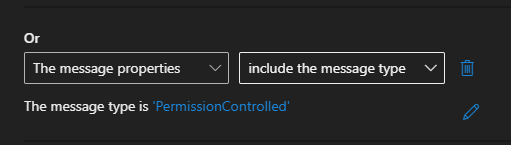
-- Add an exception to the PPE Inbound Redirect rule in Exchange Admin Center
Except if -- The message type is 'Permission Controlled'