Introduction
Vircom Portal provides a centralized way to manage customers and their products through customer and product provisioning. New customers can be added through Add Customer, and existing customers can have additional products provisioned through them through Add Product. Adding a new customer requires 1 product to be provisioned along with it.
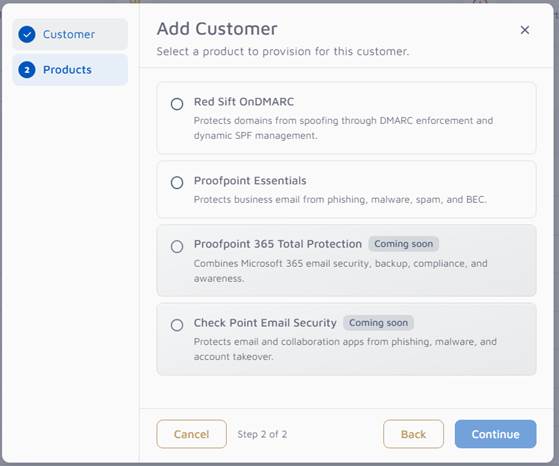
Two products can currently be provisioned, with more coming soon:
- Red Sift OnDMARC
- Proofpoint Essentials
The Vircom Portal provisioning flow will create a customer shell with basic settings for the selected product. Further settings can be configured directly in the vendor’s own portal. A product can only be provisioned once per customer and any further modifications to the product will need to be done directly through the vendor’s portal.
Provisioning
Adding a Customer
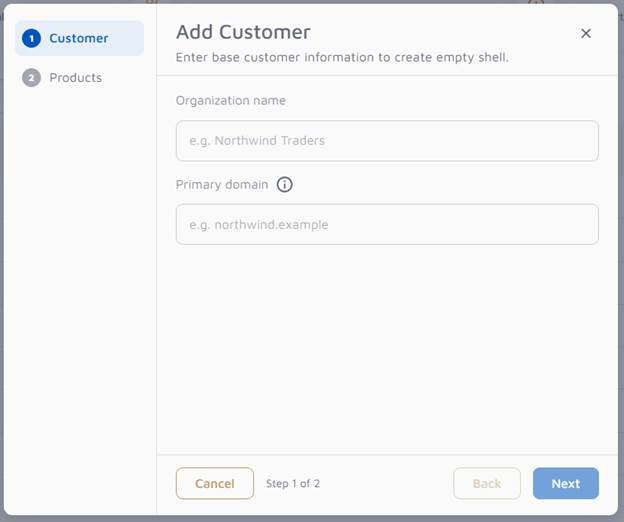
Adding a new customer with a product requires an additional step. Enter the organization name and primary domain. The primary domain identifies mail flow and reporting for this customer. Both fields are required. If adding a product to an existing customer, this step will be skipped and the organization name and primary domain for the customer in Vircom Portal will be used for the provisioning.
Provisioning Red Sift OnDMARC
Provisioning Red Sift creates the organization in Red Sift, creates the OnDMARC product, imports the customer’s active relay domains and SPF records, and creates the administrator user.
You still need to open Red Sift afterward and complete setup by taking the highlighted actions in that platform. After successful provisioning, the operation may take up to 1 hour to appear in Vircom Portal.
- Region: The region of the sift where the product is provisioned. Choose Global, US, or EU. Global is selected by default.
- Licenses: If adding the product through the Add Customer flow, enter how many licenses to provision. The value is a whole number of 0 or more. If adding the product through the Add Product flow, this field is not shown as license count is taken directly from the customer’s billable users.
- Admin email: This address becomes the administrator in Red Sift and receives the invite. It is filled in with the signed in MSP account by default, though it can be changed. It must be a full email address.
Provisioning Proofpoint Essentials
Provisioning Proofpoint Essentials creates the organization in Proofpoint Essentials with the selected product(s) and the base settings for the selected license package. After successful provisioning, the operation may take up to 5 minutes to appear in Vircom Portal.
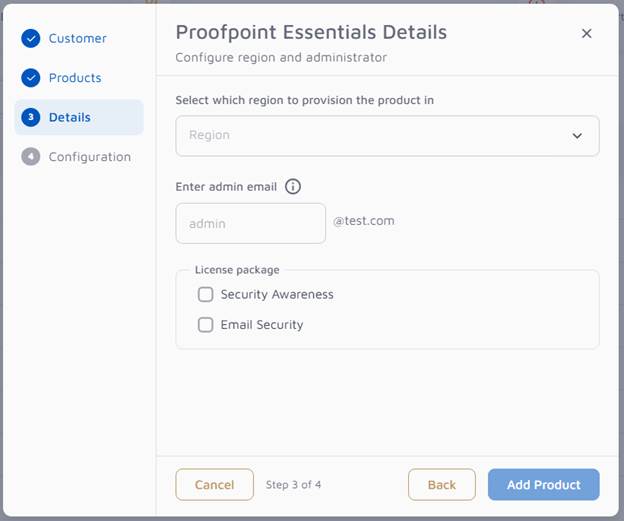
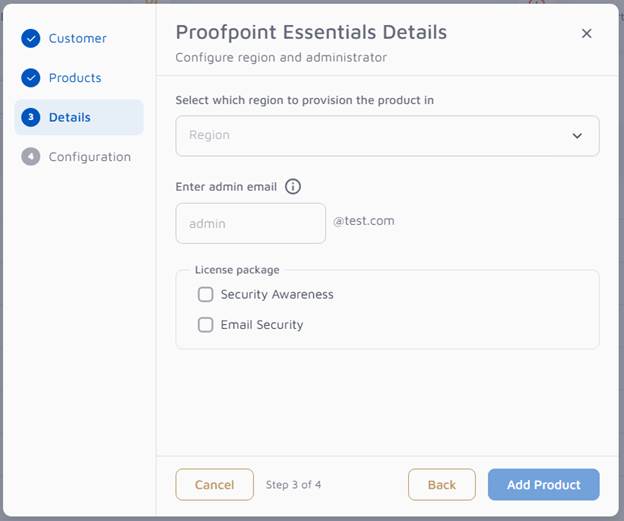
- Region: The region of the stack the product is provisioned. Choose EU or US. If your admin account has more than one US stack, those stacks are listed instead of a single US option.
- Admin email. Enter only the mailbox name. The customer’s primary domain is added after @. On Add Product, the domain is the existing customer’s domain. This address becomes the administrator in Proofpoint Essentials and receives the invite.
- License package. Select Security Awareness, Email Security, or both.
- Security Awareness can be selected on its own.
- Email Security asks you to choose a package tier: Professional Plus, Business Plus, Advanced Plus, Professional, Business, or Advanced. Compare packages opens a description of those tiers.
Successful Provisioning and Configuration
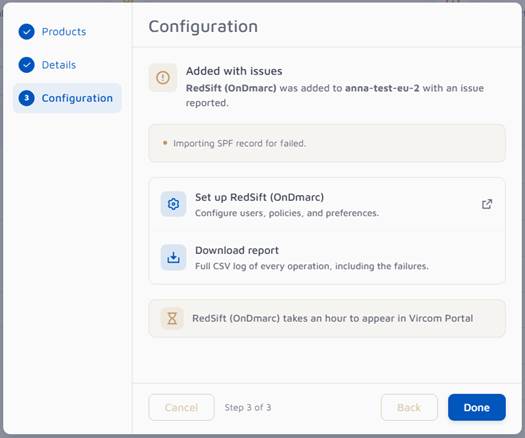
If the product provisioning is successful, a summary step will be shown.
This page reports whether the product was added, or added with issues.
- Product added means provisioning completed without a reported problem.
- Added with issues means the product was added, and one or more problems were reported. Each problem is listed on the page. The example above shows an SPF import that did not complete. The rest of the product was still added.
Two actions are available:
- Set up {product} opens that product so you can configure users, policies, and preferences. For Red Sift, this is where you address the highlighted actions in OnDMARC. For Proofpoint Essentials, this opens the Proofpoint dashboard.
- Download report saves a CSV of the provisioning results. If there were issues, the file includes those failures.